QTrobot Audio processing and Microphone
QTrobot has an integrated high-performance digital microphone array in the head: a ReSpeaker Mic Array v2.0 board with voice activity detection, direction of arrival, beamforming and noise suppression on-chip. It's connected to QTRP via USB and is fully accessible to developers, raw or processed.
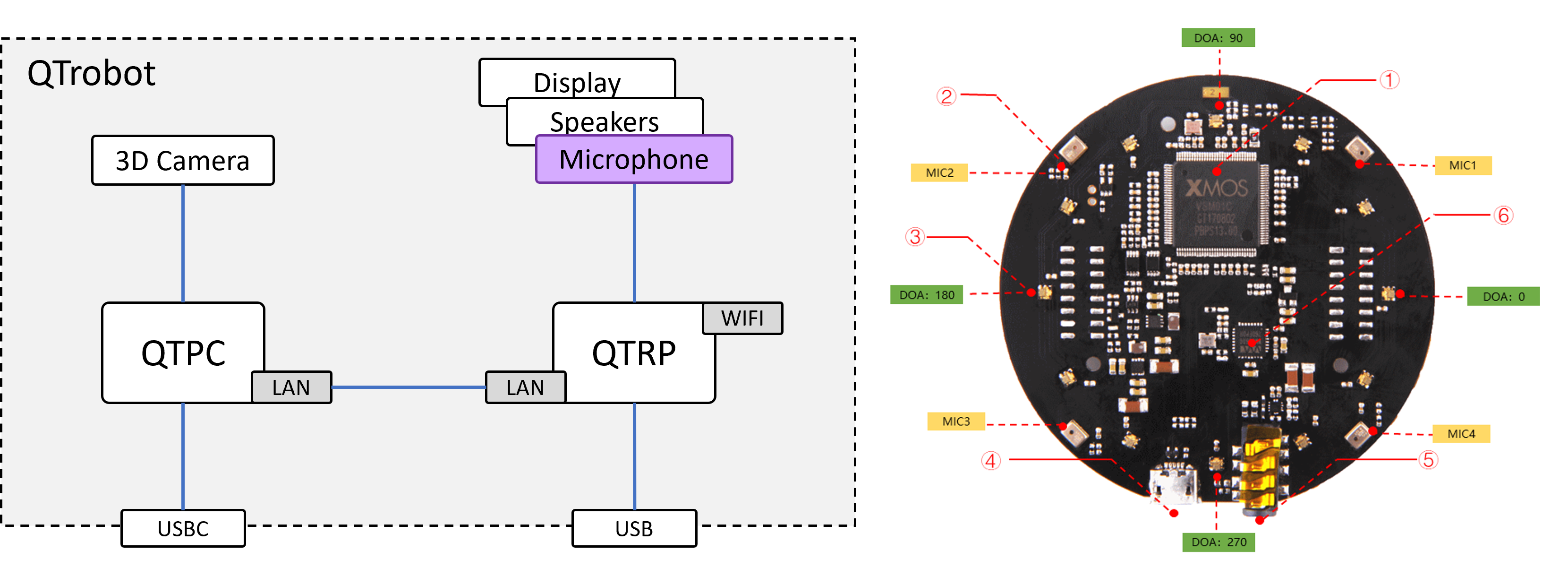
Specification:
- 4 high-performance digital microphones
- Far-field voice capture
- Speech algorithm on-chip
- 12 programmable RGB LED indicators
- Microphones: ST MP34DT01TR-M
- Sensitivity: -26 dBFS (omnidirectional)
- Acoustic overload point: 120 dB SPL
- SNR: 61 dB
- Max sample rate: 16 kHz
Software interface
Microphone audio and tuning are handled by the microphone node in qtrobot-service-hub (config microphone.yaml, ZMQ port 50550). Continuous speech recognition is a separate, optional asr plugin layered on top of it.
robot.microphone(or/qtrobot/microphone/...,/qtrobot/mic/...over ROS2): raw multichannel audio streams, DSP tuning, voice activity/direction of arrival.robot.asr(Python only, currently): continuous speech recognition, with a choice of cloud or local engines.
See the Microphone tutorial and ASR tutorial for full code walkthroughs, and the Python API reference for the complete call list.
Accessing microphone audio streams
The internal array publishes 5 channels: channel 0 is the processed, beamformed signal meant for speech recognition (with AEC applied, see below); channels 1–4 are the raw per-microphone signals, for anyone who wants to do their own array processing. If an external mic is enabled (see below), it publishes as its own separate stream.
- Python
- TypeScript/Node.js (WebRTC)
- ROS2
def on_audio(frame):
    process(frame.data)

robot.microphone.stream.on_int_audio_ch0(on_audio, queue_size=10)

# Or pull directly
reader = robot.microphone.stream.open_int_audio_ch0_reader(queue_size=10)
frame = reader.read(timeout=3.0)
const robot = await Robot.connectWebrtcMqtt(broker, robotId)

const track = await robot.extra.receiveAudioTrack('/mic/int/audio/ch0/stream:o')
const audioEl = document.getElementById('audio-el') as HTMLAudioElement
audioEl.srcObject = new MediaStream([track])
ros2 topic echo /qtrobot/mic/int/audio/ch0/stream
Channels 1–4 (and the external mic) follow the exact same pattern, just substitute ch1...ch4 or ext for ch0. The TypeScript/Node.js SDK doesn't have raw RPC-style stream access like Python or ROS2; live audio is only available there over WebRTC native tracks, the same mechanism used for the camera feed.
Voice activity and direction of arrival
A separate, lightweight event stream tells you when someone is speaking and from which direction, without needing to process raw audio yourself:
- Python
- ROS2
def on_event(frame):
    evt = frame.value
    if evt.get("activity"):
        print("Voice detected — DOA:", evt.get("direction"))

robot.microphone.stream.on_int_event(on_event, queue_size=2)
ros2 topic echo /qtrobot/mic/int/event/stream
The payload carries activity (bool, True while voice is detected) and direction (degrees, 0–359, where 270 is the front of QTrobot due to the array's orientation in the head). This stream only delivers the latest event — events can be dropped if your consumer is too slow to keep up, so don't rely on it for anything that needs every single transition.
DSP tuning
The array's on-chip DSP (gain control, noise suppression, etc.) can be read and tuned live through the SDK:
- Python
- ROS2
params = robot.microphone.get_int_tuning()
print(params.get("AGCGAIN"))

robot.microphone.set_int_tuning(name="AGCONOFF", value=1.0)
ros2 service call /qtrobot/microphone/int/tunning/get qtrobot_interfaces/srv/MicrophoneIntTunningGet "{}"
ros2 service call /qtrobot/microphone/int/tunning/set qtrobot_interfaces/srv/MicrophoneIntTunningSet \
    "{name: 'AGCONOFF', value: 1.0}"
Some parameters worth knowing:
AGCONOFF/AGCGAIN: automatic gain control on/off, and the fixed gain used when it's off.GAMMA_NS_SR/MIN_NS_SR: noise suppression strength, pre-tuned at the factory to suppress QTrobot's internal fan noise.AECFREEZEONOFF,ECHOONOFF,NLATTENONOFF,NLAEC_MODE,TRANSIENTONOFF,RT60ONOFF: the array's own on-chip echo/transient handling — typically left at their defaults, since QTrobot's software-side AEC (below) is the recommended way to handle echo.
set_int_tuning() changes apply immediately but only for the current session: they're reset the next time the microphone node restarts. To make a value permanent, set it under tunning: in microphone.yaml instead — that's what's applied at every startup.
A dedicated tuning GUI tool used to exist for this in earlier QTrobot versions; it's no longer needed since the SDK lets you read and tune every parameter live, as shown above.
Acoustic echo cancellation (AEC)
QTrobot's microphone channel 0 (the ASR-facing channel) runs through a software acoustic echo canceller (WebRTC's AEC3), so QTrobot can hear you even while it's speaking, instead of picking up its own voice. It works by feeding the same audio that's playing on the FG speaker lane (most commonly TTS) into the canceller as a reference signal, so it can be subtracted out of what the microphone hears.
aec:
  enabled: true
  playback_latency_ms: 600
  aec_stream_delay_ms: 100
  debug_record: false
  debug_dir: "/tmp"
playback_latency_ms: estimated total latency of the audio playback pipeline; used to align the reference signal in time with the echo the mic actually picks up.aec_stream_delay_ms: a residual delay correction on top of that, passed straight to AEC3.debug_record/debug_dir: when enabled, writes the reference, raw-mic and AEC-cleaned audio to WAV files, useful if you ever need to recalibrate the latency values above for a non-default audio setup (e.g. an external speaker with extra processing latency).
In practice, you shouldn't need to touch this section unless you're using an external speaker or notice degraded recognition quality while QTrobot is talking.
Using an external microphone
You can add a USB microphone alongside QTrobot's built-in array. Both can run simultaneously: enabling the external mic doesn't replace or disable the internal array, it just adds another stream. There's no way to disable internal capture alone (only microphone.enabled: false turns off the whole node, internal and external together) — if you only want to use the external mic, simply have your application subscribe to its stream and ignore the internal channels.
1. Plug in the USB microphone
Use the USB port on QTRP, at the back of the QTrobot.
2. List capture devices
ssh qtrp
arecord -l

# Example output (truncated):
**** List of CAPTURE Hardware Devices ****
card 2: ArrayUAC10 [ReSpeaker 4 Mic Array (UAC1.0)], device 0: USB Audio [USB Audio]
card 3: Mic [Samson Meteorite Mic], device 0: USB Audio [USB Audio]
3. Configure the external mic
Edit microphone.yaml:
external:
  enabled: true
  alsa_device: "plughw:Mic,0"   # ALSA device string from `arecord -l`, e.g. "plughw:3,0"
4. Restart the service hub
sudo systemctl restart qtrobot-service-hub.service
Once enabled, the external mic is published as its own stream (robot.microphone.stream.on_ext_audio_ch0(...) in Python, /qtrobot/mic/ext/audio/ch0/stream over ROS2), separate from the internal array's channels.
Speech recognition (ASR)
For continuous speech recognition, robot.asr is a plugin offering a choice of engines, Python SDK only at the moment. Each follows the same shape: configure_<engine>(...) once, then either a blocking recognize_<engine>() call or continuous streams (<engine>_speech, <engine>_event) you subscribe to.
- Parakeet (local)
- Riva (local)
- Azure
- Groq Whisper
Runs against qtrobot-parakeet-asr-server (e.g. on a Jetson Orin), with no API key and no internet dependency.
robot.enable_plugin_local("asr-parakeet")

robot.asr.configure_parakeet(
    endpoint="tcp://10.231.0.1:50860",
    language="en",
    use_vad=True,
    continuous_mode=True,
)

robot.asr.stream.on_parakeet_speech(lambda s: print("speech:", s.value))
Runs against a self-hosted NVIDIA Riva ASR server (typically a Docker container on the same network), also with no internet dependency once it's running:
pip install "luxai-robot[asr-riva]"
robot.enable_plugin_local("asr-riva")

robot.asr.configure_riva(
    server="localhost:50051",   # address of the NVIDIA Riva ASR docker server
    language="en-US",
    use_vad=True,
    continuous_mode=True,
)

robot.asr.stream.on_riva_speech(lambda s: print("speech:", s.value))
Cloud-based, the same Azure Speech service used for TTS, with broad language and accuracy coverage.
robot.enable_plugin_local("asr-azure")

robot.asr.configure_azure(
    subscription="<key>", region="westeurope",
    continuous_mode=True, use_vad=True,
)

result = robot.asr.recognize_azure()
print(result.get("text"))
Cloud-based, OpenAI Whisper served via Groq's low-latency inference API.
robot.enable_plugin_local("asr-groq")

robot.asr.configure_groq(api_key="<your-groq-api-key>", language="en", continuous_mode=True)

result = robot.asr.recognize_groq()
print(result.get("text"))
Pick Parakeet or Riva for fully local/offline recognition (no audio leaves your network), or Azure/Groq for a managed cloud engine with minimal setup. See the ASR tutorial and Python API reference for the full parameter list of each engine, streaming vs. one-shot recognition, and cancellation.
Tips for better speech recognition
The microphone array sits on top of QTrobot's head, so it's always better to talk to QTrobot from above the robot, so your voice reaches it clearly.
use_vad enabled so recognition only runs while voice is actually detected, rather than continuously processing silence.