QTrobot Vision and 3D Camera
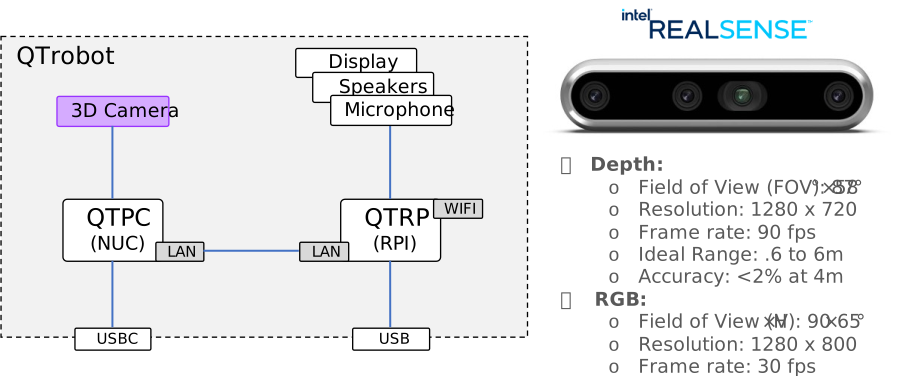
QTrobot has an integrated 3D camera in the head: an Intel® RealSense™ Depth Camera D455, connected to QTPC and fully open for developers to configure and use.
Software interface
Unlike the core capabilities (TTS, face, motors, ...), the camera isn't served by the main service hub on QTRP — it's served by a separate process, qtrobot-realsense-driver, running on QTPC. That's why it's a plugin in the Python and TypeScript/Node.js SDKs: robot.camera only becomes available once you explicitly point the SDK at this separate driver. Over ROS2, it's a second, independent gateway process running alongside the main one.
The driver talks to the physical RealSense camera and republishes its data over the same Magpie/ZMQ pattern used everywhere else in QTrobot V3 — a few RPC calls (intrinsics, depth scale) plus several independent streams (color, depth, IMU), each individually enable-able.
The driver runs as its own systemd service on QTPC, independent of the main service hub:
sudo systemctl status qtrobot-realsense-driver
sudo systemctl restart qtrobot-realsense-driver
journalctl -u qtrobot-realsense-driver -f   # view logs
Its base ZMQ port is 50750 — RPC calls go to that port directly, while RGB, depth, and IMU each get their own stream port (50751, 50752, 50753) under the hood. Connecting to a single base endpoint (shown below) discovers all of it automatically.
See the Camera tutorial and the Python, TypeScript/Node.js and ROS2 API references for full code.
What's streamed by default
Not every stream is turned on out of the box — enabling unused sensors costs CPU and bandwidth, so the driver ships with a conservative default:
| Stream | Default | Resolution / rate |
|---|---|---|
| RGB (color) | On | 848×480 @ 15 fps |
| Depth (depth, depth_aligned) | On | 640×480 @ 15 fps |
| Colorized depth (depth_color) | Off | — |
| Gyroscope (gyro) | Off | 200 Hz |
| Accelerometer (acceleration) | Off | 63 Hz |
What "aligned depth" means: the RGB and depth sensors sit at slightly different physical positions on the camera, so a raw depth pixel doesn't line up with the same pixel in the raw color image. The depth_aligned stream re-projects the depth data into the color camera's point of view, so pixel (x, y) in depth_aligned corresponds to the same (x, y) in color — this is what you want whenever you need to know "how far away is the thing at this point in the color image" (see Get the distance at a pixel below). The plain depth stream, by contrast, is in the depth sensor's own native viewpoint.
Enabling more features
To turn on something that's off by default (colorized depth, gyro, accelerometer, or to change resolution/frame rate), edit the driver's config on QTPC and restart it:
sudo nano /opt/luxai/qtrobot_realsense_driver/etc/config.yaml
use-color-depth: true   # enable colorized depth stream
use-gyro: true          # enable gyroscope
use-accel: true         # enable accelerometer
sudo systemctl restart qtrobot-realsense-driver
The same file also controls RGB/depth resolution and frame rate (rgb-width, rgb-height, rgb-fps, depth-width, depth-height, depth-fps) if you need to trade off quality for bandwidth or CPU.
Accessing the camera
Enable
- Python
- TypeScript/Node.js
- ROS2
robot.enable_plugin_zmq("realsense-driver", node_id="qtrobot-realsense-driver")
await robot.enablePluginWebrtcMqtt('camera', 'qtrobot-realsense-driver')
python -m gateway.realsense_ros2 --ros-args -p realsense_ip:=<ROBOT_IP> -r __ns:=/qtrobot
Intrinsics and depth scale
- Python
- TypeScript/Node.js
- ROS2
color_intrinsics = robot.camera.get_color_intrinsics()
depth_intrinsics = robot.camera.get_depth_intrinsics()
depth_scale = robot.camera.get_depth_scale()
const intrinsics = await robot.camera!.getColorIntrinsics()
const { scale } = await robot.camera!.getDepthScale()
ros2 service call /qtrobot/camera/color/intrinsics qtrobot_interfaces/srv/CameraColorIntrinsics "{}"
ros2 service call /qtrobot/camera/depth/scale qtrobot_interfaces/srv/CameraDepthScale "{}"
depth_scale is the number of metres represented by one raw depth unit — multiply any raw depth pixel value by it to get a real-world distance.
Image streams
- Python
- TypeScript/Node.js
- ROS2
reader = robot.camera.stream.open_color_reader()
frame = reader.read(timeout=3.0)
for await (const frame of robot.camera!.colorReader()) {
  render(frame)
}
ros2 topic hz /qtrobot/camera/color/image
The same pattern is available for depth, depth_aligned and depth_color in every language.
IMU streams
Gyroscope and accelerometer each deliver [x, y, z] — angular velocity in rad/s for gyro, linear acceleration in m/s² for acceleration:
- Python
- TypeScript/Node.js
- ROS2
robot.camera.stream.on_acceleration(lambda frame: print(frame.value))
robot.camera!.onAcceleration(frame => console.log(frame))
ros2 topic echo /qtrobot/camera/acceleration
Viewing the live camera feed
- Python (OpenCV)
- TypeScript/Node.js (WebRTC)
- ROS2
Each color frame's .data is a raw BGR pixel buffer — exactly the layout OpenCV expects, so no color conversion is needed:
import cv2
import numpy as np

reader = robot.camera.stream.open_color_reader()

while True:
    frame = reader.read(timeout=2.0)
    if frame is None:
        continue
    image = np.frombuffer(frame.data, dtype=np.uint8).reshape(frame.height, frame.width, frame.channels)
    cv2.imshow("QTrobot Camera", image)
    if cv2.waitKey(1) & 0xFF == ord("q"):
        break
Over WebRTC, the camera plugin exposes a native MediaStreamTrack you can attach straight to a <video> element — no manual frame decoding:
const track = await robot.camera!.extra.receiveVideoTrack()
videoEl.srcObject = new MediaStream([track])
videoEl.play()
ros2 topic echo /qtrobot/camera/color/image --field encoding
# or view it with any ROS2 image viewer (e.g. rqt_image_view) subscribed to
# /qtrobot/camera/color/image
Get the distance at a pixel
Combining the depth_aligned stream with depth_scale tells you how far away the thing is at any given pixel of the color image — useful for "how far is the person/object I'm looking at" style logic:
import numpy as np

depth_scale = robot.camera.get_depth_scale()["scale"]
reader = robot.camera.stream.open_depth_aligned_reader()

frame = reader.read(timeout=3.0)
depth_image = np.frombuffer(frame.data, dtype=np.uint16).reshape(frame.height, frame.width)

# Distance at the center pixel, in metres
cx, cy = frame.width // 2, frame.height // 2
distance_m = depth_image[cy, cx] * depth_scale
Because depth_aligned shares the color image's coordinate system, you can reuse the exact same (x, y) from anything you detect in the color stream, such as a face or object bounding box center, to look up its distance here.