Software Overview
QTrobot V3 is built as a modular, service-oriented robot software ecosystem. Instead of exposing the robot as one large monolithic application, QTrobot V3 separates robot capabilities into small, self-describing services and makes those services available through dynamic gateways, SDKs, ROS 2 interfaces, and plugin-based extensions.
This architecture allows the same robot capabilities to be used from different environments: directly on the robot PC, from a laptop over WiFi, from a remote cloud application, from a browser dashboard, from ROS 2 tools, or from AI pipelines that combine camera, speech, face, and motor services.
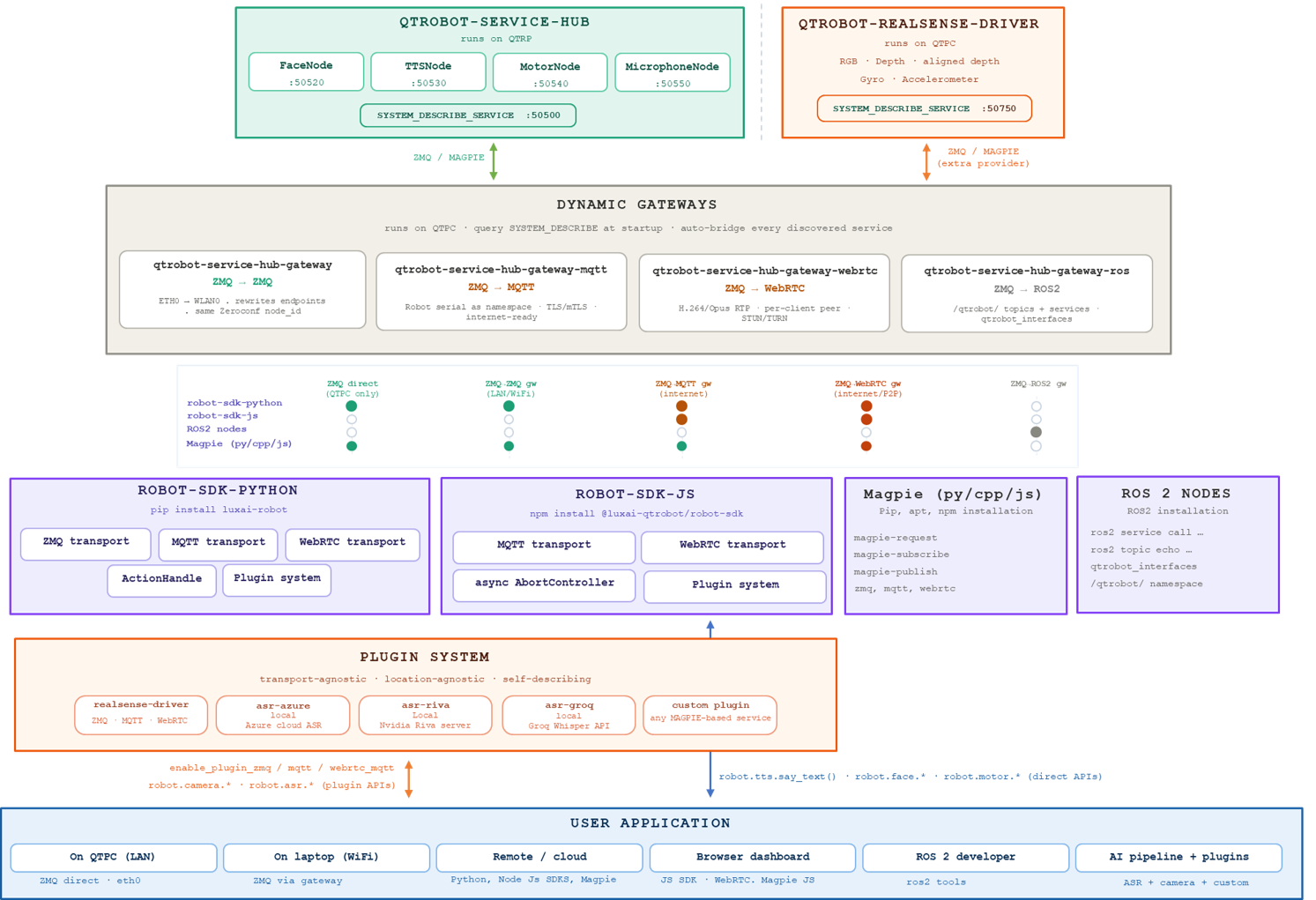
The diagram shows the core service providers at the top, the dynamic transport gateways in the middle, the developer-facing SDKs and tools below them, and the user application layer at the bottom.
High-Level Architecture
QTrobot V3 is organized into five main layers:
-
Robot service providers Core robot capabilities such as face control, speech synthesis, motor control, microphone access, and camera/IMU data are exposed as independent services.
-
Dynamic gateways Gateway processes discover the available services at startup and automatically bridge them to different transports such as ZMQ, MQTT, WebRTC, and ROS 2.
-
Client SDKs and tools Developers can access the robot using the Python SDK, TypeScript/Node SDK, the ROS2 API or directly using Magpie tools
-
Plugin system Extra capabilities such as RealSense camera access, ASR engines, local AI services, cloud AI services, and custom Magpie-based services can be added without changing the core robot API.
-
User applications Applications can run locally on the robot, on a laptop, in the cloud, in a browser, in ROS 2, or as part of an AI pipeline.
The main idea is simple: robot capabilities are exposed once as services, then dynamically made available through multiple transports and developer interfaces.
Why This Architecture Matters
The QTrobot V3 architecture provides several important benefits.
- Modular services: Each robot capability is implemented as a separate service. This makes the system easier to test, debug, replace, and extend.
- Dynamic discovery: Gateways do not need to hardcode every service endpoint. They query
SYSTEM_DESCRIBE_SERVICEand automatically bridge discovered services. - Multiple transports: The same robot services can be exposed over ZMQ, MQTT, WebRTC, or ROS 2 depending on the deployment scenario.
- Local and remote access: Applications can run directly on the robot, on the same LAN, on a remote cloud server, or inside a browser.
- SDK and tool flexibility: Developers can choose between a high-level Python SDK, TypeScript/Node SDK, Magpie tools, or ROS 2 interfaces.
- Plugin-based extensibility: New capabilities such as RealSense camera access, ASR engines, AI models, and custom services can be added as plugins.
- ROS 2 compatibility: QTrobot V3 can integrate with ROS 2 systems while keeping its internal architecture transport-agnostic and service-oriented.
Core Robot Service Hub
At the center of the robot-side architecture is the QTrobot Service Hub.
The service hub runs on QTRP and provides the core QTrobot behavior services. These services communicate using ZMQ with MessagePack and are designed to be discovered automatically.
Service Discovery Port
| Service | Port | Purpose |
|---|---|---|
SYSTEM_DESCRIBE_SERVICE | 50500 | Describes available services, endpoints, and metadata for discovery |
The most important part of this layer is the SYSTEM_DESCRIBE_SERVICE. This service makes the robot self-describing. Instead of requiring every client or gateway to know all endpoints in advance, the gateway can ask the robot what services are available and then automatically expose them through the selected transport.
RealSense Device Driver
QTrobot V3 also supports a separate QTrobot RealSense Driver, which runs on QTPC. This driver provides access to camera and sensor streams, including RGB color video, raw and RGB-aligned depth, and IMU gyroscope/accelerometer data.
In the architecture, the RealSense driver behaves as a device provider. It is discovered by the dynamic gateway layer in the same general way as the core service hub. This allows camera and IMU services to be exposed through ZMQ, MQTT, WebRTC, Magpie, SDK plugins, or higher-level AI pipelines.
Dynamic Gateways
The Dynamic Gateways layer is the main integration layer of QTrobot V3.
The gateways run on QTPC and connect the internal ZMQ/MessagePack service world to external transports and developer ecosystems.
At startup, the gateway layer queries SYSTEM_DESCRIBE_SERVICE from the available providers. It then automatically creates bridges for each discovered service.
This gives QTrobot V3 an important property:
Services only need to describe themselves once. The gateway layer can then expose them through multiple transports without hardcoding every endpoint manually.
Available gateways
| Gateway | Bridge | Main use case |
|---|---|---|
qtrobot-service-hub-gateway | ZMQ → ZMQ | Local network and WiFi access |
qtrobot-service-hub-gateway-mqtt | ZMQ → MQTT | Remote/cloud access over the internet |
qtrobot-service-hub-gateway-webrtc | ZMQ → WebRTC | Browser, real-time media, and peer-to-peer use cases |
qtrobot-service-hub-gateway-ros | ZMQ → ROS 2 | ROS 2 integration |
ZMQ-to-ZMQ Gateway
The standard gateway, qtrobot-service-hub-gateway, bridges internal ZMQ services to external ZMQ clients.
It is designed for local network use, especially when the user application is running on the robot PC, on the same LAN, or on a laptop connected through WiFi. It's also what makes the service hub reachable across networks that aren't directly routable to each other: the hub runs on QTRP's internal network, while QTPC bridges out to a separate network (e.g. its WiFi interface) that your laptop connects to. By rewriting endpoints as it bridges, the gateway exposes internal services externally without needing direct routing into QTRP's network — and this relay capability is general-purpose, so the same gateway can run on any machine to connect two otherwise-unreachable networks.
Key behavior shown in the diagram:
| Feature | Description |
|---|---|
| Transport | ZMQ → ZMQ |
| Network | ETH0 → WLAN0 |
| Endpoint handling | Rewrites endpoints for external clients |
| Discovery identity | Keeps the same ZeroConf node_id |
This gateway is useful when developers want low-latency local access while preserving the same service discovery model, or simply need to bridge two networks that can't reach each other directly.
MQTT Gateway
The MQTT gateway, qtrobot-service-hub-gateway-mqtt, bridges QTrobot services from ZMQ to MQTT.
This gateway is designed for internet-ready and cloud-friendly deployments.
Key behavior:
| Feature | Description |
|---|---|
| Transport | ZMQ → MQTT |
| Namespace | Uses the robot serial number as the namespace |
| Security | Supports TLS/mTLS |
| Target use case | Remote access, cloud applications, distributed systems |
Using the robot serial number as a namespace allows multiple robots to share the same MQTT infrastructure without topic collisions. MQTT is especially useful for remote monitoring, cloud-side AI pipelines, fleet tools, and applications that do not run on the same local network as the robot.
WebRTC Gateway
The WebRTC gateway, qtrobot-service-hub-gateway-webrtc, bridges QTrobot services to WebRTC.
This gateway is especially important for browser applications and real-time media streaming.
Key behavior:
| Feature | Description |
|---|---|
| Transport | ZMQ → WebRTC |
| Media | H.264 / Opus RTP |
| Connection model | Per-client peer connection |
| NAT traversal | STUN/TURN support |
| Target use case | Browser dashboards, real-time video/audio, remote control |
WebRTC is well suited for applications that need camera streams, audio streams, low latency, and browser compatibility. It allows QTrobot V3 to support web dashboards and remote human-robot interaction interfaces without requiring a native desktop application.
ROS 2 Gateway
The ROS gateway, qtrobot-service-hub-gateway-ros, bridges QTrobot services into the ROS 2 ecosystem.
Key behavior:
| Feature | Description |
|---|---|
| Transport | ZMQ → ROS 2 |
| Namespace | /qtrobot/ |
| Interface package | qtrobot_interfaces |
| Target use case | ROS 2 developers, research, robotics integration |
Through this bridge, QTrobot services can be accessed using standard ROS 2 tools such as:
ros2 service call ...
ros2 topic echo ...
This allows QTrobot V3 to integrate with existing ROS 2 workflows, research stacks, navigation tools, perception systems, and robotics middleware. See the ROS2 API Reference and the ROS2 Tutorials for the full set of services, topics, and node examples.
Supported Client Interfaces
QTrobot V3 supports multiple developer-facing interfaces. Each one is optimized for a different kind of application.
Transport support matrix
| Client / Tool | ZMQ direct | ZMQ-ZMQ gateway | MQTT gateway | WebRTC gateway | ROS 2 gateway |
|---|---|---|---|---|---|
| Python SDK | Yes | Yes | Yes | Yes | No |
| TypeScript/Node SDK | No | No | Yes | Yes | No |
| ROS 2 nodes | No | No | No | No | Yes |
| Magpie (py/cpp/js) | Yes | Yes | Yes | Yes | No |
This means developers can choose the client interface based on where their application runs. For example:
| Application location | Recommended interface |
|---|---|
| On QTPC | Python SDK or Magpie over direct ZMQ |
| Laptop on WiFi | Python SDK or Magpie through ZMQ gateway |
| Remote/cloud application | Python SDK, TypeScript/Node SDK, or Magpie through MQTT |
| Browser dashboard | TypeScript/Node SDK or Magpie JS through WebRTC |
| ROS 2 workspace | ROS 2 bridge and qtrobot_interfaces |
Python SDK
The Python API Reference is the main high-level programming interface for Python developers.
Installation:
pip install luxai-robot
The Python SDK provides a high-level API for controlling robot services such as speech, face behavior, motor control, microphone access, and plugin-based capabilities.
It also includes:
| Feature | Purpose |
|---|---|
ActionHandle | Manage long-running or asynchronous robot actions |
| Plugin system | Access additional services such as camera, ASR, or custom plugins |
Example API style shown in the diagram:
robot.tts.say_text(...)
robot.face.*
robot.motor.*
robot.camera.*
robot.asr.*
plugins.XYZ.*
The Python SDK is suitable for local robot applications, research scripts, AI pipelines, remote cloud services, and automation workflows. See the Python Tutorials for step-by-step walkthroughs.
TypeScript/Node SDK
The TypeScript/Node.js API Reference provides access to QTrobot V3 from Node.js and browser-based applications.
Installation:
npm install @luxai-qtrobot/robot-sdk
The TypeScript/Node SDK is designed for web applications, dashboards, browser-based robot control, and remote interfaces.
It includes:
| Feature | Purpose |
|---|---|
| MQTT transport | Remote/cloud communication |
| WebRTC transport | Browser-friendly real-time communication |
AbortController support | Cancel or interrupt asynchronous operations |
| Plugin system | Access additional robot capabilities and custom services |
This makes the TypeScript/Node SDK especially useful for browser dashboards, remote monitoring interfaces, teleoperation tools, and web-based human-robot interaction demos. See the TypeScript/Node.js Tutorials for step-by-step walkthroughs.
Magpie Tools
Magpie is a lightweight multi-language interface for accessing QTrobot services directly. It is available for:
| Language / Environment | Installation style |
|---|---|
| Python | pip |
| C++ | apt |
| TypeScript/Node | npm |
Magpie supports the main QTrobot transports:
zmq, mqtt, webrtc
Typical Magpie commands shown in the diagram include:
magpie-request
magpie-read
magpie-write
Magpie is useful when developers want a simple request, publish, or subscribe interface without using the full high-level SDK. It is also the foundation for custom services and plugins because it follows the same self-describing service model as the rest of the architecture.
Plugin System
The plugin system is one of the most important extension points in QTrobot V3.
It is designed to be:
| Property | Meaning |
|---|---|
| Transport-agnostic | Plugins can work through ZMQ, MQTT, or WebRTC |
| Location-agnostic | Plugins can run locally, on the robot PC, on a server, or in the cloud |
| Self-describing | Plugins can describe their own services so gateways and clients can discover them |
The diagram shows several plugin examples:
| Plugin | Location | Purpose |
|---|---|---|
realsense-driver | Local / robot PC | Provides camera, depth, and IMU data |
asr-azure | Local or cloud | Azure Cloud ASR integration |
asr-riva | Local | NVIDIA Riva server integration |
asr-groq | Local / cloud API | Groq Whisper API integration |
| Custom plugin | Any location | Any Magpie-based service |
This design makes it easy to extend QTrobot V3 with new AI capabilities. For example, a developer can add a new ASR engine, vision model, gesture detector, perception pipeline, or custom robot behavior service without modifying the core service hub.
Plugins can expose APIs such as:
robot.camera.*
robot.asr.*
plugins.XYZ.*
The application can then use the plugin through the same SDK and transport model as the built-in robot services. See Plugins in the Python API Reference for a hands-on walkthrough (a dedicated Python Plugins tutorial is coming soon).
User Application Deployment Models
QTrobot V3 supports several application deployment models.
Application running on QTPC
When the application runs directly on QTPC, it can use direct ZMQ communication over eth0.
This is the lowest-complexity local setup and is useful for development, testing, and applications that run directly on the robot computer.
Application running on a laptop over WiFi
When the application runs on a laptop connected to the same network, it can use the ZMQ gateway.
The gateway rewrites service endpoints and exposes the robot services over the LAN or WiFi network while keeping the same discovery model.
Remote or cloud application
Remote applications can use MQTT or WebRTC depending on the type of communication required.
MQTT is suitable for command, control, events, cloud pipelines, and distributed systems. WebRTC is suitable when the application needs real-time audio/video streams or browser compatibility.
Browser dashboard
Browser applications can use the TypeScript/Node SDK, WebRTC, and Magpie JS.
This allows developers to build web dashboards for robot monitoring, teleoperation, camera streaming, and interactive demos.
ROS 2 developer workflow
ROS 2 developers can use the ROS 2 gateway, ROS 2 topics, ROS 2 services, and the qtrobot_interfaces package.
This enables QTrobot V3 to participate in larger ROS 2 systems while keeping the internal QTrobot services independent from ROS 2.
AI pipeline and plugin workflow
AI applications can combine robot services and plugin services. For example, an AI pipeline may use:
ASR + camera + face + TTS + motor + custom plugin
This allows QTrobot V3 to support advanced interaction pipelines such as speech understanding, vision-based perception, emotion-aware behavior, or cloud-assisted intelligence.
Typical Data Flow
A typical request in QTrobot V3 follows this path:
- A user application calls an SDK method, Magpie command, or ROS 2 service.
- The selected client transport sends the request through ZMQ, MQTT, WebRTC, or ROS 2.
- The dynamic gateway receives the request.
- The gateway forwards it to the correct internal QTrobot service using ZMQ/MessagePack.
- The service executes the action or returns the requested data.
- The response, event, or stream is sent back through the same transport path.
For example, a Python application may call:
robot.tts.say_text("Hello")
The SDK sends the request through the selected transport. The gateway maps the request to the TTSNode service. The robot speaks the text, and the result is returned to the application.
The same concept applies to face control, motor commands, microphone access, camera streams, ASR plugins, and custom services.
Recommended Usage Summary
| Use case | Recommended path |
|---|---|
| Fast local development on QTPC | Python SDK or Magpie over direct ZMQ |
| Laptop development over WiFi | Python SDK or Magpie through ZMQ-ZMQ gateway |
| Cloud service or remote application | MQTT gateway |
| Browser dashboard with media streams | WebRTC gateway and TypeScript/Node SDK |
| Robotics research with ROS 2 | ROS 2 gateway and qtrobot_interfaces |
| AI pipeline with ASR/camera/custom logic | Python SDK or JS SDK with plugins |
| Custom low-level service integration | Magpie-based plugin |
Where to go next
- New to QTrobot V3? Start with the Quick Start guide.
- Ready to write code? Jump to the Python Tutorials or TypeScript/Node.js Tutorials.
- Integrating with an existing ROS2 stack? See the ROS2 Tutorials.
- Looking for full method-by-method details? See the API Reference.