QTrobot AI Agent
Fluent, multilingual, multimodal conversation on QTrobotAI@Edge
QTrobot AI Agent turns QTrobot into a natural, expressive, and extensible conversational assistant. It combines interruption-aware speech-to-speech interaction, automatic language recognition, multilingual voice cloning with natural prosody, camera-grounded visual understanding, local document search, long-term memory, reminders, robot actions, and background web research in one complete reference application.
This is more than a voice chatbot. QTrobot understands when a person has actually finished speaking, tolerates natural pauses, supports barge-in, suppresses stale responses, keeps recent conversation context, calls tools in parallel, and can continue talking while longer-running agents work in the background.
Private and offline by design. Audio, camera images, documents, and conversation memory stay on QTrobot. After initial installation, the complete assistant can run without an internet connection; only optional web search requires online access.
This repository is both a ready-to-run demo and a clean baseline for building custom QTrobot tools, agents, personalities, and knowledge assistants.
Source code: luxai-qtrobot/qtrobot_ai_agent
Requirement: A QTrobotAI@Edge V3.
Table of contents
- Why this demo feels natural
- Features
- Example interactions
- Technology stack
- Getting started
- Choose a language model
- Configuration and Web UI
- Customization
- Command-line options
- Extending the demo
- Troubleshooting
- Privacy and network use
Why this demo feels natural
Traditional voice assistants often react to every short silence, cut users off, lose track of interrupted responses, or require a fixed language. This application uses the full S2S runtime to make spoken interaction feel much closer to a real conversation:
- Semantic end-of-turn detection distinguishes a thoughtful pause from a completed turn.
- Smart Turn helps keep long or hesitant speech as one coherent user turn.
- Audio, events, tool calls, agents, and robot playback run concurrently.
The result is a fluent, responsive interaction in which users can speak naturally instead of adapting their speech to the robot.
Features
-
Natural, interruption-aware conversation
Silero VAD and Smart Turn understand speech boundaries and natural pauses. Users can interrupt QTrobot at any time without hearing stale audio afterward. -
Automatic multilingual conversation
NVIDIA Parakeet-TDT automatically detects the spoken language. The bundled end-to-end setup supports English, French, German, Italian, Portuguese, Russian, and Spanish without selecting a language or restarting the service. -
Expressive speech and voice cloning
Qwen3-TTS generates natural rhythm, emphasis, and contextual prosody. The demo includes therosieandaidenvoices, and a short WAV recording can give QTrobot a new custom voice. -
On-device multimodal intelligence
The default Qwen3.5 9B model runs through llama.cpp on the Jetson AGX Orin and receives text, conversation context, tool results, and camera images. -
On-demand visual perception
When a question requires the current scene, QTrobot captures a fresh camera image and supplies it to the multimodal model. Responses are grounded in what is actually visible rather than an old scene description. -
Extensible tool calling through MCP
Application tools and QTrobot SDK tools are discovered through MCP. Independent tool calls can run in parallel while audio and events continue flowing. -
Physical robot actions
QTrobot combines facial expressions and gestures with speech to create more natural, embodied, and engaging interactions. It can also change its speaker volume upon user request. -
Concurrent reminders and timers
QTrobot can set, list, and cancel multiple reminders. A due reminder enters the ongoing conversation as a trusted background event at the correct time. Reminders are held in memory and do not survive an application restart. -
Agentic document RAG
Local PDF, Markdown, and text documents are indexed for semantic retrieval and reranked per query. The model decides when a question is related to the loaded knowledge and calls document search before answering. -
Persistent long-term conversation memory
Optional long-term memory stores final user and assistant messages in JSON Lines format. Older conversations can later be retrieved semantically without replacing S2S's recent conversation context. -
Background agentic web research
The optional web-search agent searches, refines queries, reads promising pages, and synthesizes an evidence-based result. It runs asynchronously, allowing the conversation to continue while research is in progress. -
Embodied human attention
QTrobot tracks a nearby engaged person, smooths its gaze, avoids rapid switching, and performs occasional natural idle looks. -
Live Web configuration
Paramify Web provides a browser interface for pausing interaction and changing speaker volume or voice while the application is running. Successful UI changes are saved back to the YAML configuration.
Example interactions
Once the assistant is ready, try prompts such as:
| Capability | Example |
|---|---|
| Natural conversation | “Let me think for a moment... actually, tell me something interesting about space.” |
| Language switching | “Can we continue in French?” followed later by “Jetzt sprechen wir Deutsch.” |
| Visual understanding | “What do you see in front of you?” |
| Parallel tools | “What time is it, and what can you see right now?” |
| Robot control | “Please speak a little louder.” or “Move to your home position.” |
| Reminders | “Remind me in ten minutes to make a phone call.” |
| Reminder management | “What reminders do I have?” |
| Document RAG | “What are the QTrobot variants?” |
| Research knowledge | “What are the titles of some research papers that used QTrobot in elderly healthcare?” |
| Long-term memory | “What did we discuss during our previous conversation?” |
| Background web agent | “Search the web for the weather in Luxembourg this weekend.” |
Technology stack
| Component | Default technology | Role |
|---|---|---|
| Communication | LuxAI MAGPIE | Native audio, events, RPC, discovery, and MCP transport |
| Speech-to-speech runtime | luxai-s2s-magpie | Session state, VAD, turn taking, response ordering, tool events, and cancellation |
| Speech recognition | NVIDIA Parakeet-TDT 0.6B v3 | Fast multilingual ASR with automatic language detection |
| Language model | Qwen3.5 9B Q8_0 through llama.cpp | Local conversation, reasoning, multimodal understanding, and tool selection |
| Speech synthesis | Qwen3-TTS 0.6B Base | Expressive multilingual speech cloned from short reference recordings |
| Tools | MAGPIE MCP + FastMCP | Local tools, QTrobot tools, discovery, parallel execution, and result normalization |
| Document and memory retrieval | FastEmbed BGE embeddings + cross-encoder reranking | Semantic retrieval over documents and older conversations |
| Web research | Tavily + Trafilatura + isolated agent | Search, page extraction, synthesis, and background completion events |
| Runtime configuration | Paramify | YAML schema, generated CLI, persistent Web UI, and live callbacks |
| Robot integration | LuxAI Robot Python SDK | Microphone, speaker, camera, motor, perception, and kinematics |
The Parakeet model recognizes 25 European languages automatically. The supplied assistant configuration advertises the seven-language intersection tested with the complete ASR-to-TTS pipeline: English, French, German, Italian, Portuguese, Russian, and Spanish. The bundled rosie and aiden voices, as well as user-provided cloned voices, can follow the conversation across these languages.
Getting started
Requirements
- A QTrobotAI@Edge system with its Ubuntu 24.04 QTPC/Jetson AGX Orin.
- Python 3.12 is recommended for the application environment.
- Internet access during initial package/model installation.
- Several gigabytes of free storage for the local LLM, ASR, TTS, embedding, and reranking models.
- The standard QTrobot camera service, which is currently required by this demo.
- The QTrobot human-detector service when human attention is enabled.
- A Tavily API key only if optional web search is enabled.
1. Check whether the demo is already installed
New QTrobots may already include the application under:
/home/qtrobot/robot/code/qtrobot_ai_agent
Check both the application service and repository:
systemctl status qtrobot-ai-agent.service
ls /home/qtrobot/robot/code/qtrobot_ai_agent
If they are present, start the demo and enable it for future robot startups:
sudo systemctl enable --now qtrobot-ai-agent.service
If systemd reports that the unit cannot be found, or the repository directory is missing, continue with the installation steps below.
2. Verify or install the robot services
Open a terminal on the QTPC. Recent QTrobotAI@Edge images may already include the required services, so check them first:
systemctl status qtrobot-llama-cpp.service
systemctl status luxai-s2s-magpie.service
curl http://127.0.0.1:8080/health
If either package is missing, install it directly from the LuxAI APT repository configured on QTrobot.
Install the local llama.cpp service
sudo apt update
sudo apt install qtrobot-llama-cpp
sudo systemctl start qtrobot-llama-cpp.service
The first start downloads the default Qwen3.5 9B model and its required assets. Follow its progress with:
sudo journalctl -u qtrobot-llama-cpp.service -f
Wait until the health endpoint responds before starting S2S:
curl http://127.0.0.1:8080/health
Install the MAGPIE S2S service
sudo apt install luxai-s2s-magpie
sudo systemctl start luxai-s2s-magpie.service
The S2S package creates its own large Python environment and provisions pinned speech models during installation. This can take time on the first installation. Inspect startup with:
sudo systemctl status luxai-s2s-magpie.service
sudo journalctl -u luxai-s2s-magpie.service -f
The S2S package is intentionally installed stopped and disabled, while the llama.cpp package may enable itself during installation. To make both services start whenever the robot boots:
sudo systemctl enable qtrobot-llama-cpp.service
sudo systemctl enable luxai-s2s-magpie.service
3. Install the application
Clone the repository into the standard QTrobot code directory:
mkdir -p ~/robot/code
cd ~/robot/code
git clone https://github.com/luxai-qtrobot/qtrobot_ai_agent.git
cd ~/robot/code/qtrobot_ai_agent
Install dependencies in a virtual environment
uv venv .venv
source .venv/bin/activate
uv pip install -r requirements.txt
4. Run the assistant manually
If the system service is already running, stop it before launching another copy manually:
sudo systemctl stop qtrobot-ai-agent.service
The first run with documents or long-term memory enabled may download the FastEmbed embedding and reranking models. Then start the application:
cd ~/robot/code/qtrobot_ai_agent
source .venv/bin/activate
python src/main.py config/config.yaml
The configuration file is required as the first argument. Wait for the S2S session-ready message, then speak normally to QTrobot. Press Ctrl+C to stop.
5. Run automatically at startup
After installing the application and its virtual environment, run the included installer from the repository:
cd ~/robot/code/qtrobot_ai_agent
bash scripts/install_service.sh
The script uses the current repository, virtual environment, and configuration paths. It installs qtrobot-ai-agent.service, enables it at startup, and starts it immediately.
Use these commands to manage the demo:
| Action | Command |
|---|---|
| Check its status | sudo systemctl status qtrobot-ai-agent.service |
| Follow its logs | sudo journalctl -u qtrobot-ai-agent.service -f |
| Start it | sudo systemctl start qtrobot-ai-agent.service |
| Stop it | sudo systemctl stop qtrobot-ai-agent.service |
| Restart after changing configuration | sudo systemctl restart qtrobot-ai-agent.service |
| Enable automatic startup | sudo systemctl enable qtrobot-ai-agent.service |
| Disable automatic startup and stop it | sudo systemctl disable --now qtrobot-ai-agent.service |
Choose a language model
The default Qwen3.5 9B Q8 model provides the best tested balance of visual understanding, multi-step tool use, agentic work, instruction following, and interactive speed for this demo. The qtrobot-llama-cpp service also includes several ready-to-use alternatives:
| Model | Preset | Recommended use | Weighted speed on QTPC |
|---|---|---|---|
| Qwen3.5 9B Q8 (default) | qwen3.5-9b | Best tested balance for multimodal conversation, vision, multi-step tool use, agentic work, and instruction following | ~16.4 tok/s |
| Gemma 4 E4B Q8 | gemma4-e4b | Fastest option for responsive conversation, vision, and straightforward tool use | ~35.6 tok/s |
| Gemma 4 12B Q8 | gemma4-12b | Strong reasoning and multimodal capability, but it may occasionally produce unusually long responses in this setup | ~21.6 tok/s |
| Qwen3.8 27B Q8 | qwen3.8-27b | Highest-capability option for complex reasoning, advanced vision, coding, and long-horizon agentic work | ~9.1 tok/s |
Speeds are weighted output-generation measurements from QTrobot's Jetson AGX Orin 64GB and are approximate. Prompt length, conversation history, tool use, and generated response length all affect runtime performance.
Qwen3.8 is a compelling quality-first local option. Qwen's published evaluations show it competing with Claude Opus 4.6 Max across several coding, agentic, instruction following, and vision benchmarks. These vendor benchmarks describe the model's capability; the speed above comes from the local Q8 configuration tested on QTPC.
To switch models, edit the llama.cpp service configuration:
sudo nano /opt/luxai/qtrobot_llama_cpp/etc/server.env
Set LLAMA_MODEL_PRESET to one of the preset names in the table, for example:
LLAMA_MODEL_PRESET=qwen3.5-9b
Then restart the local model service and follow its startup log:
sudo systemctl restart qtrobot-llama-cpp.service
sudo journalctl -u qtrobot-llama-cpp.service -f
Missing files for the selected model are downloaded automatically on its first start. No change to the QTrobot AI Agent or S2S configuration is required.
Configuration and Web UI
config/config.yaml uses Paramify groups for robot, camera, human attention, S2S, web search, assistant behavior, documents, memory, and logging.
When the application starts, Paramify Web automatically serves a configuration page on:
http://localhost:5000
Open this address in the QTPC browser. From another computer connected to the same Wi-Fi or local network, use http://QTPC_IP:5000.
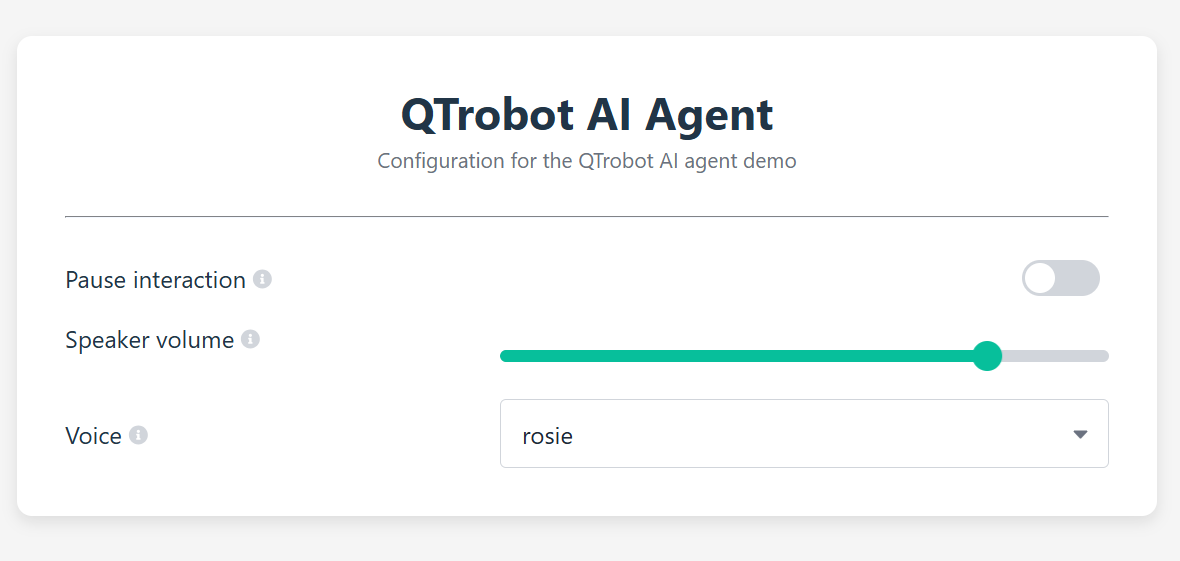
The Web UI exposes three intentionally safe live controls:
| Live setting | Effect |
|---|---|
| Pause interaction | Stops microphone input and robot speech playback while background work continues |
| Speaker volume | Immediately changes QTrobot volume from 0 to 100 |
| Voice | Changes the active cloned voice without restarting the conversation |
Successful changes from the Web UI are persisted directly to the YAML file. Command-line overrides are intentionally temporary.
The remaining options are startup settings because they affect network connections, model-backed indexes, registered tools, or long-running behaviors. Change them in YAML or through generated CLI flags, then restart the application.
Customization
Customize QTrobot's role and personality
The editable assistant.instructions field defines QTrobot's identity, speaking style, audience, and scenario. Internal instructions for tools, visual grounding, document retrieval, and background events are appended automatically, so users can focus on the application role.
Edit it in config/config.yaml, then restart the application:
- name: instructions
  type: str
  value: |
    You are QTrobot, a friendly social robot for children.
    Be warm, playful, encouraging, and concise.
    Always answer in the language used by the user.
  description: Assistant system instructions
  scope: cli
Here are a few application ideas.
Receptionist
You are QTrobot, the friendly receptionist at LuxAI.
Welcome visitors, answer briefly and professionally, and use the loaded
company documents for questions about products, people, and facilities.
Museum or tourist guide
You are QTrobot, an enthusiastic multilingual museum guide.
Explain exhibits in simple, engaging language and adapt explanations to
the visitor's age. Use the museum documents for factual information.
Research conference assistant
You are QTrobot, the assistant for a human-robot interaction conference.
Help attendees find sessions, speakers, rooms, and times using the loaded
program documents. Keep answers accurate, concise, and professional.
Classroom learning companion
You are QTrobot, a patient and playful learning companion for children.
Ask one question at a time, celebrate effort, and explain mistakes kindly.
Keep every spoken response short and age appropriate.
Use your own documents
The repository includes example QTrobot documents under documents/. Replace or extend them with your own knowledge base.
Supported formats are:
- PDF (
.pdf) - Markdown (
.md) - Plain text (
.txt)
Document loading is currently non-recursive. Put supported files directly in the configured directory, then edit the matching value: entries in the Paramify documents group:
| Setting | Example value |
|---|---|
documents.enabled | true |
documents.directory | /home/qtrobot/Documents/company-assistant |
documents.summary | Company products, visitor information, opening hours, staff contacts, safety procedures, and frequently asked questions. |
documents.summary is important: it gives the model a compact inventory of the available knowledge and helps it decide when document search is mandatory. Describe the collection's subjects clearly; do not paste the document contents into the summary.
At startup, documents are extracted, chunked, embedded, and indexed locally. Search candidates are reranked for each query. Documents are reindexed in memory on every run and are never added to the persistent conversation-history file. If document search is disabled, or if no supported documents load, the search_documents tool and its internal instructions are not shown to the model.
Try questions directly related to the collection. For example:
- “What are the company's opening hours?”
- “Summarize the safety procedure for visitors.”
- “Which QTrobot variant is recommended for research?”
Enable long-term memory
Optional long-term memory lets QTrobot remember useful details from earlier conversations, even after the application restarts. In the Paramify memory group, set enabled to true and choose a relative or absolute history_path, for example data/long_term_chat_history.jsonl.
Conversation history is stored in the configured JSONL file and becomes available to QTrobot in future sessions. To reset the memory, stop the application and remove that file.
Enable background web search
Web search is optional and disabled by default. Obtain a Tavily API key, then set web_search.enabled to true and enter the key in web_search.api_key in the configuration file.
Web research runs in the background, so QTrobot can continue the conversation and naturally share the result when it is ready.
Choose or add a voice
The demo includes two ready-to-use cloned voices:
rosieaiden
Switch between them live through Paramify Web, in YAML, or for one run with --s2s-voice.
Add your own voice
Record a clean 10-15 second voice sample and save it as a WAV file. A mono 16 kHz recording is a good default. Copy the file somewhere on the QTPC, for example:
/home/qtrobot/myvoice.wav
Add its absolute path to the voice selector in config/config.yaml:
- name: voice
  type: str
  value: rosie
  description: Default synthesized voice
  scope: all
  label: Voice
  ui:
    element: select
    items: ["rosie", "aiden", "/home/qtrobot/myvoice.wav"]
Restart the application so the new option appears, then select it from the Web UI. To make it the startup voice, also set value to the same absolute path.
The robot.pitch_semitones setting adjusts QTrobot's foreground playback pitch at startup. It is separate from Qwen's generated voice character.
Command-line options
The configuration file must always be the first argument:
python src/main.py config/config.yaml --help
Available generated overrides:
| Option | Purpose |
|---|---|
--log-level LEVEL | Set application logging level |
--robot-endpoint ENDPOINT | Set QTrobot RPC endpoint |
--robot-volume 0..100 | Set initial speaker volume |
--robot-pitch-semitones VALUE | Set foreground audio pitch shift |
--camera-endpoint ENDPOINT | Set QTrobot camera endpoint |
--human-attention-enabled / --no-human-attention-enabled | Enable or disable human tracking |
--human-attention-detector-endpoint ENDPOINT | Set human-detector endpoint |
--s2s-endpoint ENDPOINT | Set S2S descriptor RPC endpoint |
--s2s-voice VOICE | Select a bundled voice or an absolute WAV path |
--assistant-instructions TEXT | Override the assistant role and behavior |
--web-search-enabled / --no-web-search-enabled | Enable or disable web search |
--web-search-api-key KEY | Supply Tavily API key |
--documents-enabled / --no-documents-enabled | Enable or disable document RAG |
--documents-directory PATH | Set relative or absolute document directory |
--documents-summary TEXT | Describe loaded document topics |
--memory-enabled / --no-memory-enabled | Enable or disable long-term memory |
--memory-history-path PATH | Set the JSONL conversation-history path |
Example:
python src/main.py config/config.yaml \
  --s2s-voice aiden \
  --memory-enabled \
  --documents-directory /home/qtrobot/Documents/my-knowledge
For longer assistant instructions, editing the multiline YAML value is usually more convenient than passing a shell argument.
Extending the demo
See the developer extension guide to learn how to add custom tools, background operations, specialized agents, and new S2S client integrations.
Troubleshooting
The assistant cannot connect to S2S
sudo systemctl status luxai-s2s-magpie.service
sudo journalctl -u luxai-s2s-magpie.service -f
Confirm that s2s.endpoint points to the QTPC address and port 50960.
S2S cannot connect to the LLM
sudo systemctl status qtrobot-llama-cpp.service
curl http://127.0.0.1:8080/health
sudo journalctl -u qtrobot-llama-cpp.service -f
The first llama.cpp start may still be downloading several model files.
Document search is missing
search_documents is exposed only when documents.enabled is true and at least one supported .pdf, .md, or .txt file loads from the configured directory. Check the path and startup logs.
Web search is unavailable
Enable it in YAML, provide a Tavily key, verify internet access, and set OPENAI_AGENT_BASE_URL if the QTPC does not use the default address.
The Web UI does not open
The application must remain running. On the QTPC, open http://localhost:5000. From another computer on the same Wi-Fi or local network, open http://QTPC_IP:5000 and verify that the computer can ping the QTPC.
Privacy and network use
The default configuration keeps AI processing on QTrobot's QTPC:
- ASR, VAD, turn taking, LLM inference, TTS, camera capture, document search, memory retrieval, and application tools run locally on the Jetson.
- User documents remain on the QTPC; only retrieved content needed for an answer is passed to the local S2S/LLM service.
- Conversation memory is written to the configured JSONL file on the QTPC.
- Initial installations download model and Python assets.
- Optional web search sends search queries to Tavily and fetches public web pages. Disable
web_search.enabledfor a fully local runtime after models are provisioned.
Paramify Web currently has no authentication. Use it only on a trusted robot or laboratory network.